
Nginx Proxy Manager
Nginx Proxy Manager is a popular tool in the homelab community for managing reverse proxies. While it differs from Traefik and Caddy due to Nginx’s lack of native 302 redirect support in the auth_request module, Tinyauth provides API paths specifically designed to work with it.
Example Docker Compose File
Section titled “Example Docker Compose File”The following Docker Compose file demonstrates how to set up Nginx Proxy Manager, Whoami, and Tinyauth:
services:  npm:    image: jc21/nginx-proxy-manager:2    restart: unless-stopped    ports:      - 80:80      - 443:443      - 81:81    volumes:      - npm-data:/data      - npm-letsencrypt:/etc/letsencrypt
  # Whoami is not required, but serves as a simple example app to demonstrate Tinyauth integration. You can replace it with any app of your choice.  whoami:    image: traefik/whoami:latest    restart: unless-stopped
  tinyauth:    image: ghcr.io/tinyauthapp/tinyauth:v5    restart: unless-stopped    environment:      - TINYAUTH_APPURL=http://tinyauth.example.com      - TINYAUTH_AUTH_USERS=user:$$2a$$10$$UdLYoJ5lgPsC0RKqYH/jMua7zIn0g9kPqWmhYayJYLaZQ/FTmH2/u # user:password
volumes:  npm-data:  npm-letsencrypt:
OAuth and access controls can be configured using Docker labels and environment variables. All other configuration is managed through the Nginx Proxy Manager UI.
Configuring Nginx Proxy Manager
Section titled “Configuring Nginx Proxy Manager”Creating the Tinyauth Host
Section titled “Creating the Tinyauth Host”Create a host for Tinyauth in Nginx Proxy Manager. Configure it as any other host:
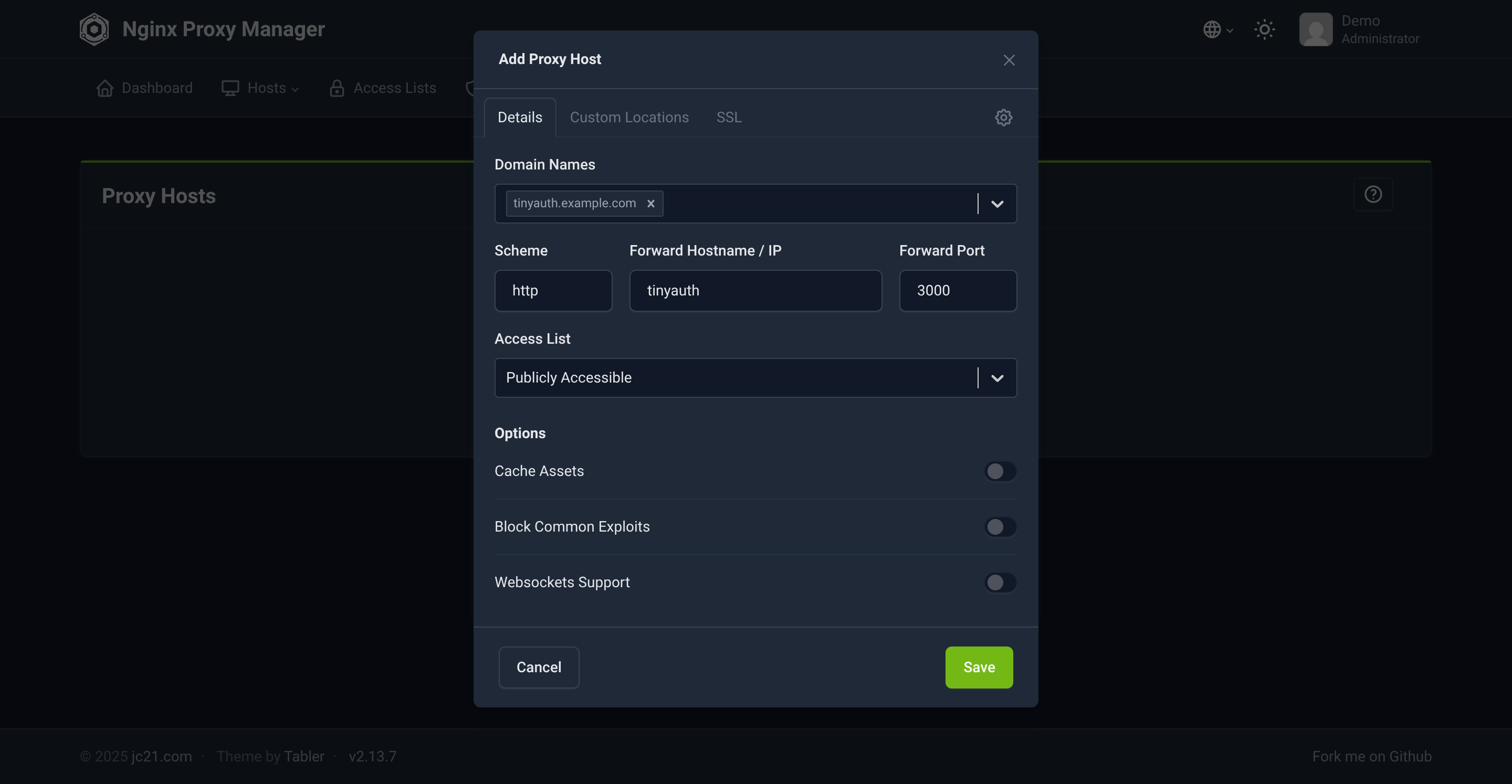
SSL can be set up if certificates are available.
Configuring Protected Hosts
Section titled “Configuring Protected Hosts”For protected hosts, such as Whoami, configure the Details tab similarly to the Tinyauth host:
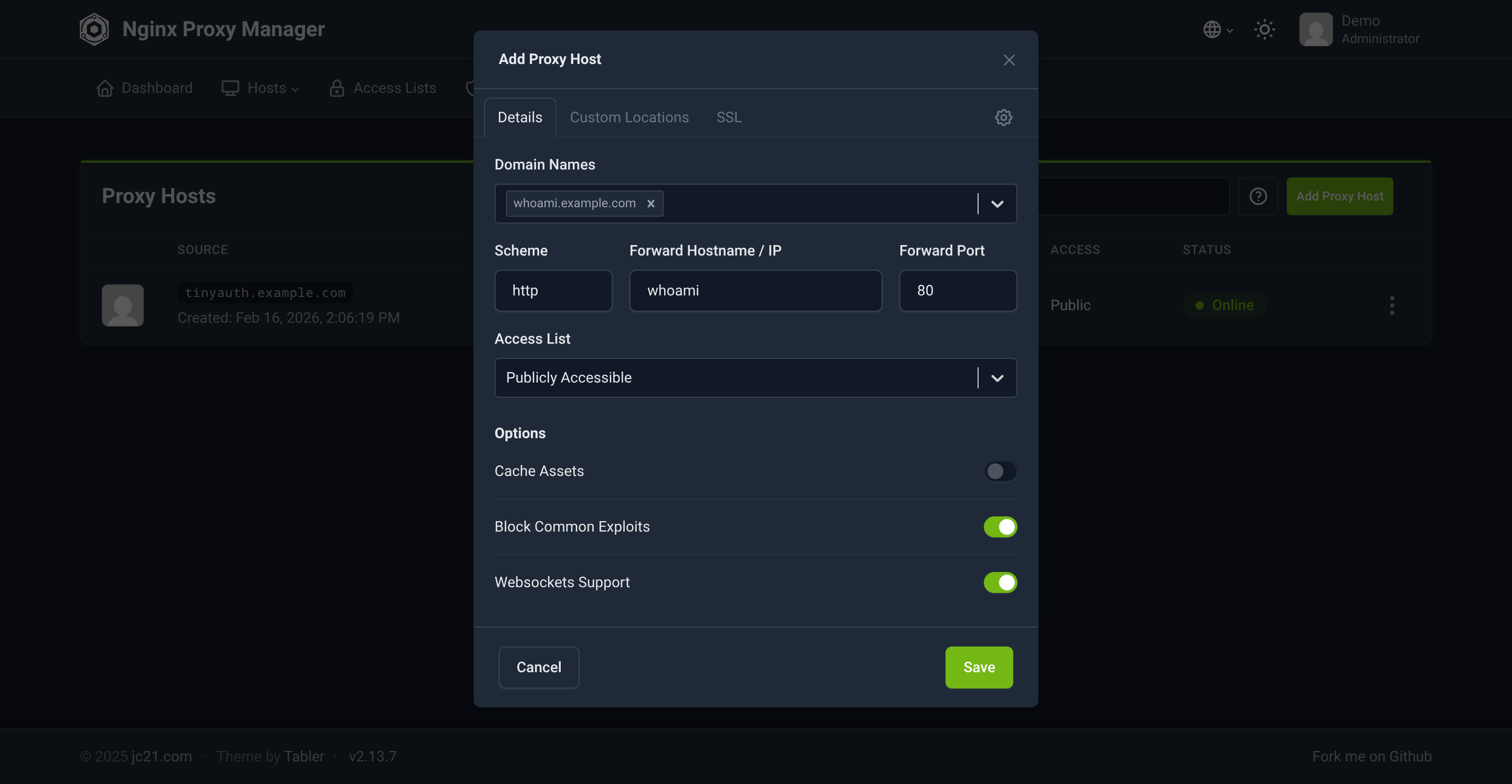
SSL can be configured as needed.
Advanced Configuration
Section titled “Advanced Configuration”Add the following configuration in the Advanced tab to enable Tinyauth authentication:
# Root locationlocation / {  # Pass the request to the app  proxy_pass          http://whoami:80; # Replace with your app URL, e.g. http://10.10.10.25:80
  # Add other app-specific config here
  # Tinyauth auth request  auth_request /tinyauth;  auth_request_set $redirection_url $upstream_http_x_tinyauth_location;  error_page 401 403 =302 $redirection_url;}
# Tinyauth auth requestlocation /tinyauth {  # Mark the location as internal to prevent direct access  internal;
  # Pass request to Tinyauth, do not use the Tinyauth domain here, use the internal Docker network name and port or the IP and port of the Tinyauth instance  proxy_pass http://tinyauth:3000/api/auth/nginx;
 # Don't forward the request body to the auth subrequest  proxy_pass_request_body off;  proxy_set_header content-length "";
  # Pass the request headers  proxy_set_header x-original-url $scheme://$http_host$request_uri;  proxy_set_header x-original-method $request_method;  proxy_set_header x-forwarded-for $proxy_add_x_forwarded_for;  proxy_set_header x-real-ip $remote_addr;}
It is recommended (and required for IP address ACLs) that you set the TINYAUTH_AUTH_TRUSTEDPROXIES environment variable (--auth.trustedproxies for CLI flags and auth.trustedProxies for YAML) to the IP address of your Nginx instance so Tinyauth can trust the X-Real-IP and X-Forwarded-Forheaders and get the correct client IP.
Save the host configuration. Accessing the protected host will redirect to the Tinyauth login page if not already logged in. Repeat this process for each host to be protected by Tinyauth.